
Mixcraft Beta 3 testing page |
| Current version being tested M3 build 3 More to come as I test M3 beta more |
| Some of the items below may be in the process of being fixed, added or not added. It's hard to say without a "to be done yet" listing from Acoustica. It would be nice to see a list of what is still do be done so that the testers don't bug them for items that will be on the next Beta release. I hate to waste Acoustica's and my time. |
| Wish list - I always want to grab a track and move it up or down more than one track at a time. As it stands, you have to right click on a track and chose move up or down one track at a time. I end up doing that 10 times to move tracks to the bottom or top of the project. |
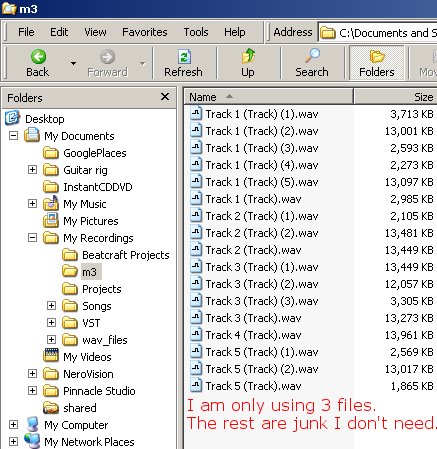 |
Wish list - File/project moving utility. <- This example is just a small test project. Some projects end up with 50 files in a folder. Maybe only 20 of them are really being used on the project. I end up with lots of bad takes, takes that I re-do, files that I end up not using, etc in a Mixcraft project folder. There's is no way to delete all these unused files except to write down every file used in a project and then go to the folder and weed out all the unused files. What a pain!!! Ever start a song and not have a name for it? I will write a song and name the folder UnamedTune3, or whatever. Later on, I will have named the tune. Now I want to name my Folder Stir Crazy or whatever the tune name is. If you rename that folder your project will be trashed. Mixcraft will start searching for the file names. Say it is searching for drum6.wav. I must have 30 drum6.wav files in all my different project folders. It will pick the first drum6.wav file that it finds as it searches for the file. That's not the drum6.wav file I used on the project. Your project is trashed unless you keep the same file folder name and do not move that folder. I need a utility that can move and rename a project. I could then delete the old folder and free up tons of disk space. The unused files would be deleted, problem solved. Acoustica doesn't seem interested in doing this so here's an easy way for Acoustica to do this. Make an export function that will export the MXC project file into an XML file or a formatted text file. I can parse the file myself and write my own Perl program. |
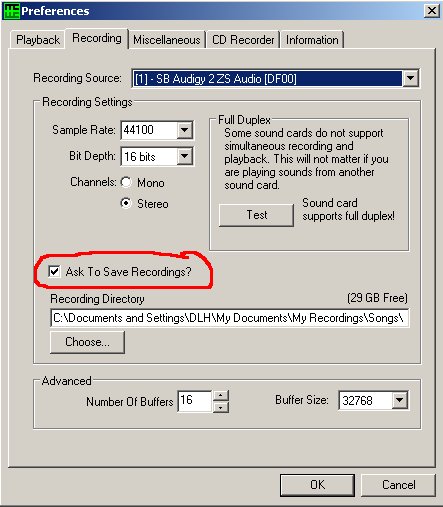 |
This is a Mixcraft 2 screen shot. The Ask To Save Recording option is missing in the M3 preferences. This adds bad takes and unwanted files to the project folder. |
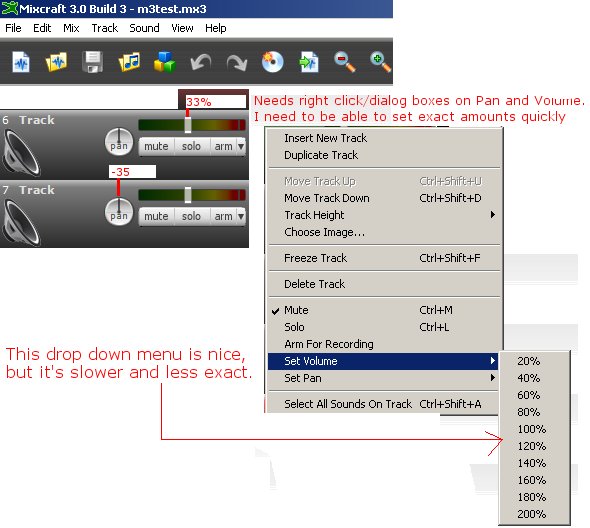 |
I would like to have a right click dialog box open up for the Volume and Pan settings. I enter exact amounts in M2 all the time. The drop down box in M# is nice but it is slow. Moving the slider or pan pot to get 33% is not very fast or easy. |
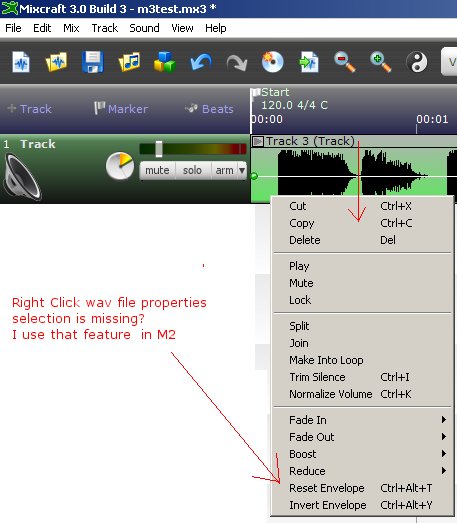 |
When you right click on a wav file, the file properties is missing. I used this in M2 to find out where the file was located and sound properties. |
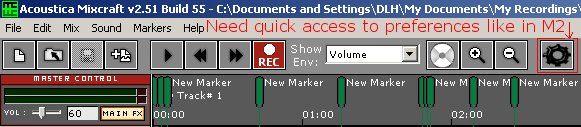 |
The preferences toolbar button is missing.
This was a handy feature in M2. |
Enter My Tube Amp Parts Store Here
Mobile users Enter My Tube Amp Parts Store Here
The Tube amp Library of information
Click the link above for Tube amp info, Schematics, Board building information, Projects, Mods, Transformer diagrams, Photo's, Sound clips.
There are hundreds of pages of Tube amp information on my library page.
Please visit my Tube Amplifier Forum
Here's the place you can go to ask tube amplifier questions.
You will find a large community of friendly amp builders at the link above.
Check the huge library of Schematics here
Design your own custom Turret Board or Eyelet board
DIY Layout Creator file analyzer program
DIY Layout Creator file library
Sound clips and tunes of all types
How to email me
|
MEMBER OF PROJECT HONEY POT Spam Harvester Protection Network provided by Unspam |